QA Test Scenario Generator
Test scenarios
Create comprehensive test scenarios from user stories with test objectives, starting conditions, user roles, step-by-step actions, and expected outcomes. Use when writing QA test cases, creating test plans, defining acceptance tests, or…
---
name: test-scenarios
description: "Create comprehensive test scenarios from user stories with test objectives, starting conditions, user roles, step-by-step actions, and expected outcomes. Use when writing QA test cases, creating test plans, defining acceptance tests, or preparing for feature validation."
---
# Test Scenarios

Create comprehensive test scenarios from user stories with test objectives, starting conditions, user roles, step-by-step test actions, and expected outcomes.

**Use when:** Writing QA test cases, creating test plans, defining acceptance test scenarios, or validating user story implementations.

**Arguments:**
- `$PRODUCT`: The product or system name
- `$USER_STORY`: The user story to test (title and acceptance criteria)
- `$CONTEXT`: Additional testing context or constraints

## Step-by-Step Process

1. **Review the user story** and acceptance criteria
Overview
Create comprehensive test scenarios from user stories with test objectives, starting conditions, user roles, step-by-step test actions, and expected outcomes.
What you get
- Comprehensive test scenarios for each acceptance criterion
- Clear test objectives aligned with user story intent
- Detailed step-by-step test actions
- Observable expected outcomes after each step
- Edge case and error scenario coverage
- Ready for QA team execution and documentation
Manual install (npx, ZIP)
npx skills add phuryn/pm-skills --skill test-scenarios -g -a claude-codenpx degit phuryn/pm-skills/pm-execution/skills/test-scenarios#main ~/.claude/skills/test-scenariosConnects with Agent Alley MCP · agentalley.io/mcp
Files included
SKILL.md3.4 KB
Read SKILL.md here
Show the full text87 lines
Test Scenarios
Create comprehensive test scenarios from user stories with test objectives, starting conditions, user roles, step-by-step test actions, and expected outcomes.
Use when: Writing QA test cases, creating test plans, defining acceptance test scenarios, or validating user story implementations.
Arguments:
$PRODUCT: The product or system name$USER_STORY: The user story to test (title and acceptance criteria)$CONTEXT: Additional testing context or constraints
Step-by-Step Process
- Review the user story and acceptance criteria
- Define test objectives - What specific behavior to validate
- Establish starting conditions - System state, data setup, configurations
- Identify user roles - Who performs the test actions
- Create test steps - Break down interactions step-by-step
- Define expected outcomes - Observable results after each step
- Consider edge cases - Invalid inputs, boundary conditions
- Output detailed test scenarios - Ready for QA execution
Scenario Template
Test Scenario: [Clear scenario name]
Test Objective: [What this test validates]
Starting Conditions:
- [System state required]
- [Data or configuration needed]
- [User setup or permissions]
User Role: [Who performs the test]
Test Steps:
- [First action and its expected result]
- [Second action and observable outcome]
- [Third action and system behavior]
- [Completion action and final state]
Expected Outcomes:
- [Observable result 1]
- [Observable result 2]
- [Observable result 3]
Example Test Scenario
Test Scenario: View Recently Viewed Products on Product Page
Test Objective: Verify that the 'Recently viewed' section displays correctly and excludes the current product.
Starting Conditions:
- User is logged in or has browser history enabled
- User has viewed at least 2 products in the current session
- User is now on a product page different from previously viewed items
User Role: Online Shopper
Test Steps:
- Navigate to any product page → Section should appear at bottom with previously viewed items
- Scroll to bottom of page → "Recently viewed" section is visible with product cards
- Verify product thumbnails → Images, titles, and prices are displayed correctly
- Check current product → Current product is NOT in the recently viewed list
- Click on a product card → User navigates to the corresponding product page
Expected Outcomes:
- Recently viewed section appears only after viewing at least 1 prior product
- Section displays 4-8 product cards with complete information
- Current product is excluded from the list
- Each card shows "Viewed X minutes/hours ago" timestamp
- Clicking cards navigates to correct product pages
- Performance: Section loads within 2 seconds
Output Deliverables
- Comprehensive test scenarios for each acceptance criterion
- Clear test objectives aligned with user story intent
- Detailed step-by-step test actions
- Observable expected outcomes after each step
- Edge case and error scenario coverage
- Ready for QA team execution and documentation
| 1 | |
| 2 | name test-scenarios |
| 3 | description "Create comprehensive test scenarios from user stories with test objectives, starting conditions, user roles, step-by-step actions, and expected outcomes. Use when writing QA test cases, creating test plans, defining acceptance tests, or preparing for feature validation." |
| 4 | |
| 5 | # Test Scenarios |
| 6 | |
| 7 | Create comprehensive test scenarios from user stories with test objectives, starting conditions, user roles, step-by-step test actions, and expected outcomes. |
| 8 | |
| 9 | **Use when:** Writing QA test cases, creating test plans, defining acceptance test scenarios, or validating user story implementations. |
| 10 | |
| 11 | **Arguments:** |
| 12 | `$PRODUCT`: The product or system name |
| 13 | `$USER_STORY`: The user story to test (title and acceptance criteria) |
| 14 | `$CONTEXT`: Additional testing context or constraints |
| 15 | |
| 16 | ## Step-by-Step Process |
| 17 | |
| 18 | **Review the user story** and acceptance criteria |
| 19 | **Define test objectives** - What specific behavior to validate |
| 20 | **Establish starting conditions** - System state, data setup, configurations |
| 21 | **Identify user roles** - Who performs the test actions |
| 22 | **Create test steps** - Break down interactions step-by-step |
| 23 | **Define expected outcomes** - Observable results after each step |
| 24 | **Consider edge cases** - Invalid inputs, boundary conditions |
| 25 | **Output detailed test scenarios** - Ready for QA execution |
| 26 | |
| 27 | ## Scenario Template |
| 28 | |
| 29 | **Test Scenario:** [Clear scenario name] |
| 30 | |
| 31 | **Test Objective:** [What this test validates] |
| 32 | |
| 33 | **Starting Conditions:** |
| 34 | [System state required] |
| 35 | [Data or configuration needed] |
| 36 | [User setup or permissions] |
| 37 | |
| 38 | **User Role:** [Who performs the test] |
| 39 | |
| 40 | **Test Steps:** |
| 41 | [First action and its expected result] |
| 42 | [Second action and observable outcome] |
| 43 | [Third action and system behavior] |
| 44 | [Completion action and final state] |
| 45 | |
| 46 | **Expected Outcomes:** |
| 47 | [Observable result 1] |
| 48 | [Observable result 2] |
| 49 | [Observable result 3] |
| 50 | |
| 51 | ## Example Test Scenario |
| 52 | |
| 53 | **Test Scenario:** View Recently Viewed Products on Product Page |
| 54 | |
| 55 | **Test Objective:** Verify that the 'Recently viewed' section displays correctly and excludes the current product. |
| 56 | |
| 57 | **Starting Conditions:** |
| 58 | User is logged in or has browser history enabled |
| 59 | User has viewed at least 2 products in the current session |
| 60 | User is now on a product page different from previously viewed items |
| 61 | |
| 62 | **User Role:** Online Shopper |
| 63 | |
| 64 | **Test Steps:** |
| 65 | Navigate to any product page → Section should appear at bottom with previously viewed items |
| 66 | Scroll to bottom of page → "Recently viewed" section is visible with product cards |
| 67 | Verify product thumbnails → Images, titles, and prices are displayed correctly |
| 68 | Check current product → Current product is NOT in the recently viewed list |
| 69 | Click on a product card → User navigates to the corresponding product page |
| 70 | |
| 71 | **Expected Outcomes:** |
| 72 | Recently viewed section appears only after viewing at least 1 prior product |
| 73 | Section displays 4-8 product cards with complete information |
| 74 | Current product is excluded from the list |
| 75 | Each card shows "Viewed X minutes/hours ago" timestamp |
| 76 | Clicking cards navigates to correct product pages |
| 77 | Performance: Section loads within 2 seconds |
| 78 | |
| 79 | ## Output Deliverables |
| 80 | |
| 81 | Comprehensive test scenarios for each acceptance criterion |
| 82 | Clear test objectives aligned with user story intent |
| 83 | Detailed step-by-step test actions |
| 84 | Observable expected outcomes after each step |
| 85 | Edge case and error scenario coverage |
| 86 | Ready for QA team execution and documentation |
| 87 |
Details
- Updated
- Sep 14, 2026
- License
- MIT
- Stars on the repo
- ★ 26,557
- Checked
- Source
- phuryn/pm-skills ↗
- Creator
- phuryn · 69 listings
Similar skills
See all → SkillImplement Spec
 mattpocock/skills · by mattpocockImplement the result of /to-spec and /to-tickets in code.★ 267k GitHub stars
 SkillAcademy Guide
 anthropics/skills · by anthropicsStop and check this skill before finishing any reply to a question about how to use Claude or a Claude product — it recommends matching courses, tutorials, and use cases from Claude Academy (academy.claude.com), Anthropic's learning hub. Trigger on: "how do I", "how can I", "getting started with", "what can Claude do", "teach me", "learn to use"; questions about artifacts, projects, skills, plugins, connectors, MCP; requests about rolling Claude out to a team, class, or organization; and any ask for training materials, onboarding content, or learning resources. Use it when the user is learning how to use a feature or product — not when they are mid-task and just want the task done. This skill composes with other skills: after consulting product documentation to answer how a Claude feature works, also check here for a matching course or tutorial — a docs-grounded answer and an Academy recommendation belong together. Only recommend on a strong match; never invent Academy content.★ 178k GitHub stars
 SkillFeature Request Prioritizer
 phuryn/pm-skills · by phurynAnalyze and prioritize a list of feature requests by theme, strategic alignment, impact, effort, and risk. Use when reviewing customer feature requests, triaging a backlog, or making prioritization decisions.★ 26.6k GitHub stars
 SkillAdvocacy Program Designer
 aaron-he-zhu/aaron-marketing-skills · by aaron-he-zhuUse when the user asks to "design an employee advocacy program", "set up founder-led sharing", or "build a share kit for the team"; produces an advocacy program blueprint in two modes — participation-driven opt-in (default) or top-down assigned with its coercion and authenticity risks flagged — with a voluntary opt-in roster spec submitted as channel-registry proposal events, share kits with mandatory per-person variation, staggered human posting windows plus anti-pod guardrails (no coordinated identical reshares, no engagement rings), per-person material-connection disclosure lines per FTC and 《互联网广告管理办法》, and a Slack/Teams distribution spec. Not for paid creator campaigns — use campaign-planner. 员工倡导/创始人IP分享/内部分享计划/披露合规★ 2.9k GitHub stars
 SkillModel-Driven App Builder
 microsoft/power-platform-skills · by microsoftBuilds and edits a model-driven Power Apps app from a natural-language intent — tables, columns, relationships, adaptive forms with sub-grids, views, Choice-column charts, business rules, business process flows, generative page intents for overview/dashboard surfaces (page `.tsx` generated in generate-pages after plan approval), and an app module + sitemap — via the headless cds-maker-sdk. Runs an interactive, multi-turn authoring flow (env selection, jobs-to-be-done first, then design-only App Spec authoring across confirmed levels, guardrail lint, plan-mode approval, generate-pages, full build) and a narrated build, and can download a deployed app back into an editable spec to change it. Use when the user says "build an app for X", "create a model-driven app", "make me an app to manage Y", "add a business process flow", or "edit/add to my app". This skill stands alone and does not require /genpage — but for a standalone generative page added to an app that already exists, use /genpage instead.★ 954 GitHub stars
 SkillCinetic Motion Engine
 Leonxlnx/cinetic · by LeonxlnxDirect, build and render premium cinematic motion design from code — launch films, product and feature videos, looping feature animations for landing pages and social, logo stings and reveals, UI walkthroughs, app demos, kinetic type, teasers, trailers, intros and promo clips. Use this whenever the user wants any video, animation, motion graphic or animated demo made with Remotion, HyperFrames, HTML/GSAP or React, or asks to storyboard, time, score, render, polish or critique one — even if they only say "make a video about X", "animate this feature" or "we need a launch clip". It supplies concept and copy discipline, type and colour taste that defers to a supplied brand, a beat-locked timeline that drives both picture and a code-made soundtrack, choreography and transition craft, real product UI in motion, film-grade finishing (true motion blur, no banding, BT.709, sync-checked mux) and a measured self-critique loop on contact sheets and renders.★ 347 GitHub stars
More from phuryn
 SkillA/B Test Analyzerphuryn/pm-skills · by phurynAnalyze A/B test results with statistical significance, sample size validation, confidence intervals, and ship/extend/stop recommendations. Use when evaluating experiment results, checking if a test reached significance, interpreting split test data, or deciding whether to ship a variant.★ 26.6k GitHub starsSkillFeature Request Prioritizerphuryn/pm-skills · by phurynAnalyze and prioritize a list of feature requests by theme, strategic alignment, impact, effort, and risk. Use when reviewing customer feature requests, triaging a backlog, or making prioritization decisions.★ 26.6k GitHub stars
 SkillAnsoff Matrix Generatorphuryn/pm-skills · by phurynGenerate an Ansoff Matrix analysis mapping growth strategies across market penetration, market development, product development, and diversification. Use when considering growth options, planning market expansion, or evaluating strategic growth paths.★ 26.6k GitHub stars
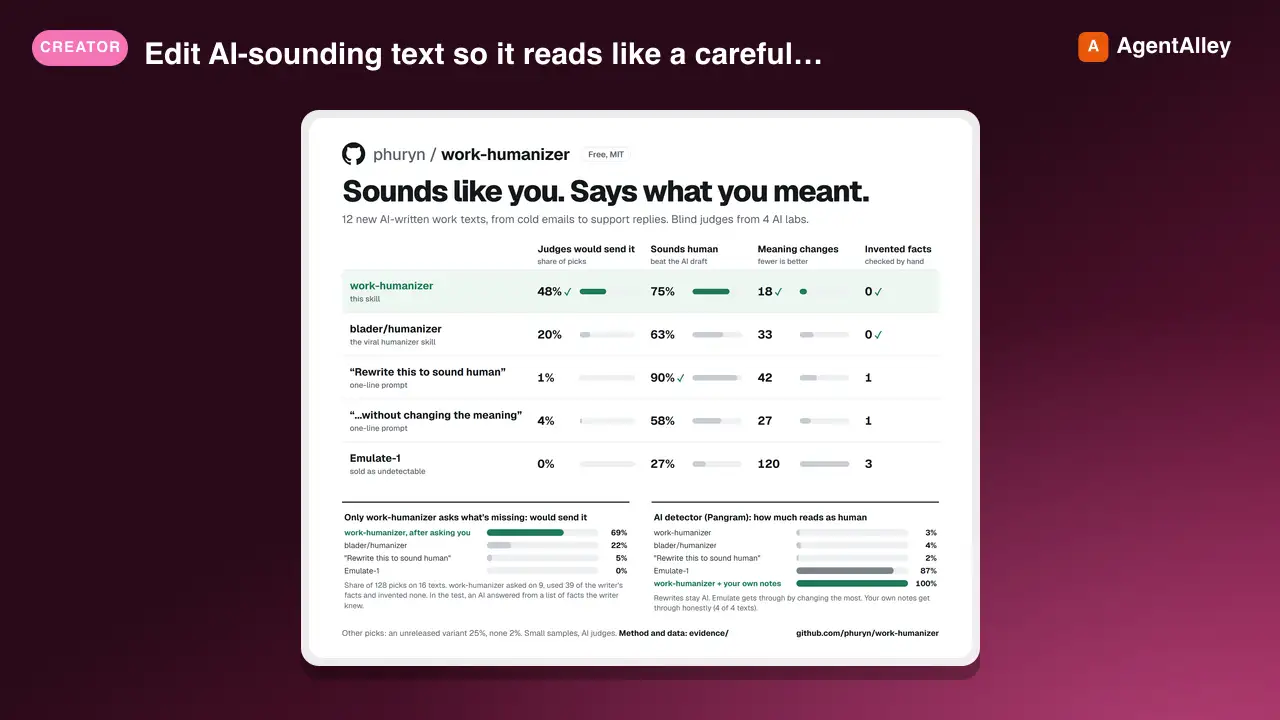 SkillAI Text Humanizerphuryn/work-humanizer · by phurynEdit AI-sounding text so it reads like a careful person wrote it, without changing what it says or commits to. Built for work writing where the wording matters: sales and marketing copy, support replies, HR and legal letters, emails, docs, release notes, posts, landing pages. Two modes. Rewrite: edit the text you are given. Interview: when a draft is AI-composed and thin, ask the writer 3-5 sharp questions and build the piece from their answers, in their words. Also writes from the writer's own notes or a voice-memo transcript. Calibrated on measured differences between human and AI writing.★ 110 GitHub stars
 SkillMarket Segment Identifierphuryn/pm-skills · by phurynIdentify the first beachhead market segment for a product launch. Evaluates segments against burning pain, willingness to pay, winnable market share, and referral potential. Use when choosing a first market, targeting an initial customer segment, or planning market entry strategy.★ 26.6k GitHub stars
 SkillProduct Experiment Designerphuryn/pm-skills · by phurynDesign experiments to test assumptions for an existing product — prototypes, A/B tests, spikes, and other low-effort validation methods. Use when validating assumptions, testing feature ideas cheaply, or planning product experiments.★ 26.6k GitHub stars