Sora Video Generator
Sora
Use when the user asks to generate, remix, poll, list, download, or delete Sora videos via OpenAI\u2019s video API using the bundled CLI (`scripts/sora.py`), including requests like \u201cgenerate AI video,\u201d \u201cSora,\u201d…
---
name: "sora"
description: "Use when the user asks to generate, remix, poll, list, download, or delete Sora videos via OpenAI\u2019s video API using the bundled CLI (`scripts/sora.py`), including requests like \u201cgenerate AI video,\u201d \u201cSora,\u201d \u201cvideo remix,\u201d \u201cdownload video/thumbnail/spritesheet,\u201d and batch video generation; requires `OPENAI_API_KEY` and Sora API access."
author: openai
---


# Sora Video Generation Skill

Creates or manages short video clips for the current project (product demos, marketing spots, cinematic shots, UI mocks). Defaults to `sora-2` and a structured prompt augmentation workflow, and prefers the bundled CLI for deterministic runs. Note: `$sora` is a skill tag in prompts, not a shell command.

## When to use
- Generate a new video clip from a prompt
- Remix an existing video by ID
- Poll status, list jobs, or download assets (video/thumbnail/spritesheet)
- Batch runs (many prompts or variants)

## Decision tree (create vs remix vs status/download vs batch)
Overview
Creates or manages short video clips for the current project (product demos, marketing spots, cinematic shots, UI mocks). Defaults to sora-2 and a structured prompt augmentation workflow, and prefers the bundled CLI for deterministic runs. Note: $sora is a skill tag in prompts, not a shell command.
Manual install (npx, ZIP)
npx skills add davila7/claude-code-templates --skill sora -g -a claude-codenpx degit davila7/claude-code-templates/cli-tool/components/skills/video/sora#main ~/.claude/skills/soraConnects with Agent Alley MCP · agentalley.io/mcp
Files included
SKILL.md8.0 KB
Read SKILL.md here
Show the full text155 lines
Sora Video Generation Skill
Creates or manages short video clips for the current project (product demos, marketing spots, cinematic shots, UI mocks). Defaults to sora-2 and a structured prompt augmentation workflow, and prefers the bundled CLI for deterministic runs. Note: $sora is a skill tag in prompts, not a shell command.
When to use
- Generate a new video clip from a prompt
- Remix an existing video by ID
- Poll status, list jobs, or download assets (video/thumbnail/spritesheet)
- Batch runs (many prompts or variants)
Decision tree (create vs remix vs status/download vs batch)
- If the user has a video id and wants a change → remix
- If the user has a video id and wants status or assets → status/poll/download
- If the user needs many prompts/assets → create-batch
- If the user asks for two versions with a small change (same shot, different subject/detail) → create the base, then remix for the variation
- Otherwise → create (or create-and-poll if they need a ready asset in one step)
Workflow
- Decide intent: create vs remix vs status/download vs batch.
- Collect inputs: prompt, model, size, seconds, and any input reference image.
- If batch: write a temporary JSONL under tmp/ (one job per line), run once, then delete the JSONL.
- Prefer CLI augmentation flags (
--use-case,--scene,--camera, etc.) instead of pre-writing a structured prompt. If you already produced a structured prompt file, pass--no-augmentto avoid double-wrapping. - Run the bundled CLI (
scripts/sora.py) with sensible defaults (see references/cli.md). For long prompts, prefer--prompt-fileto avoid shell-escaping issues; pair with--no-augmentif the prompt is already structured. - For async jobs, poll until complete (or use create-and-poll).
- Download assets (video/thumbnail/spritesheet) and save locally.
- Remove intermediate files created during invocation (for example
prompt.txt,remix_job.json, temp JSONL). If the sandbox blocksrm, skip cleanup or truncate the files without surfacing an error. - Iterate with a single targeted change per prompt.
Authentication
OPENAI_API_KEYmust be set for live API calls.
If the key is missing, give the user these steps:
- Create an API key in the OpenAI platform UI: https://platform.openai.com/api-keys
- Set
OPENAI_API_KEYas an environment variable in their system. - Offer to guide them through setting the environment variable for their OS/shell if needed.
- Never ask the user to paste the full key in chat. Ask them to set it locally and confirm when ready.
Defaults & rules
- Default model:
sora-2(usesora-2-profor higher fidelity). - Default size:
1280x720. - Default seconds:
4(allowed: "4", "8", "12" as strings). - Always set size and seconds via API params; prose will not change them.
- Use the OpenAI Python SDK (
openaipackage); do not use raw HTTP. - Require
OPENAI_API_KEYbefore any live API call. - If uv cache permissions fail, set
UV_CACHE_DIR=/tmp/uv-cache. - Input reference images must be jpg/png/webp and should match target size.
- Download URLs expire after about 1 hour; copy assets to your own storage.
- Prefer the bundled CLI and never modify
scripts/sora.pyunless the user asks. - Sora can generate audio; if a user requests voiceover/audio, specify it explicitly in the
Audio:andDialogue:lines and keep it short.
API limitations
- Models are limited to
sora-2andsora-2-pro. - API access to Sora models requires an organization-verified account.
- Duration is limited to 4/8/12 seconds and must be set via the
secondsparameter. - The API expects
secondsas a string enum ("4", "8", "12"). - Output sizes are limited by model (see
references/video-api.mdfor the supported sizes). - Video creation is async; you must poll for completion before downloading.
- Rate limits apply by usage tier (do not list specific limits).
- Content restrictions are enforced by the API (see Guardrails below).
Guardrails (must enforce)
- Only content suitable for audiences under 18.
- No copyrighted characters or copyrighted music.
- No real people (including public figures).
- Input images with human faces are rejected.
Prompt augmentation
Reformat prompts into a structured, production-oriented spec. Only make implicit details explicit; do not invent new creative requirements.
Template (include only relevant lines):
Use case: <where the clip will be used>
Primary request: <user's main prompt>
Scene/background: <location, time of day, atmosphere>
Subject: <main subject>
Action: <single clear action>
Camera: <shot type, angle, motion>
Lighting/mood: <lighting + mood>
Color palette: <3-5 color anchors>
Style/format: <film/animation/format cues>
Timing/beats: <counts or beats>
Audio: <ambient cue / music / voiceover if requested>
Text (verbatim): "<exact text>"
Dialogue:
<dialogue>
- Speaker: "Short line."
</dialogue>
Constraints: <must keep/must avoid>
Avoid: <negative constraints>
Augmentation rules:
- Keep it short; add only details the user already implied or provided elsewhere.
- For remixes, explicitly list invariants ("same shot, change only X").
- If any critical detail is missing and blocks success, ask a question; otherwise proceed.
- If you pass a structured prompt file to the CLI, add
--no-augmentto avoid the tool re-wrapping it.
Examples
Generation example (single shot)
Use case: product teaser
Primary request: a close-up of a matte black camera on a pedestal
Action: slow 30-degree orbit over 4 seconds
Camera: 85mm, shallow depth of field, gentle handheld drift
Lighting/mood: soft key light, subtle rim, premium studio feel
Constraints: no logos, no text
Remix example (invariants)
Primary request: same shot and framing, switch palette to teal/sand/rust with warmer backlight
Constraints: keep the subject and camera move unchanged
Prompting best practices (short list)
- One main action + one camera move per shot.
- Use counts or beats for timing ("two steps, pause, turn").
- Keep text short and the camera locked-off for UI or on-screen text.
- Add a brief avoid line when artifacts appear (flicker, jitter, fast motion).
- Shorter prompts are more creative; longer prompts are more controlled.
- Put dialogue in a dedicated block; keep lines short for 4-8s clips.
- State invariants explicitly for remixes (same shot, same camera move).
- Iterate with single-change follow-ups to preserve continuity.
Guidance by asset type
Use these modules when the request is for a specific artifact. They provide targeted templates and defaults.
- Cinematic shots:
references/cinematic-shots.md - Social ads:
references/social-ads.md
CLI + environment notes
- CLI commands + examples:
references/cli.md - API parameter quick reference:
references/video-api.md - Prompting guidance:
references/prompting.md - Sample prompts:
references/sample-prompts.md - Troubleshooting:
references/troubleshooting.md - Network/sandbox tips:
references/codex-network.md
Reference map
references/cli.md: how to run create/poll/remix/download/batch viascripts/sora.py.references/video-api.md: API-level knobs (models, sizes, duration, variants, status).references/prompting.md: prompt structure and iteration guidance.references/sample-prompts.md: copy/paste prompt recipes (examples only; no extra theory).references/cinematic-shots.md: templates for filmic shots.references/social-ads.md: templates for short social ad beats.references/troubleshooting.md: common errors and fixes.references/codex-network.md: network/approval troubleshooting.
| 1 | |
| 2 | name "sora" |
| 3 | description "Use when the user asks to generate, remix, poll, list, download, or delete Sora videos via OpenAI\u2019s video API using the bundled CLI (`scripts/sora.py`), including requests like \u201cgenerate AI video,\u201d \u201cSora,\u201d \u201cvideo remix,\u201d \u201cdownload video/thumbnail/spritesheet,\u201d and batch video generation; requires `OPENAI_API_KEY` and Sora API access." |
| 4 | author openai |
| 5 | |
| 6 | |
| 7 | |
| 8 | # Sora Video Generation Skill |
| 9 | |
| 10 | Creates or manages short video clips for the current project (product demos, marketing spots, cinematic shots, UI mocks). Defaults to `sora-2` and a structured prompt augmentation workflow, and prefers the bundled CLI for deterministic runs. Note: `$sora` is a skill tag in prompts, not a shell command. |
| 11 | |
| 12 | ## When to use |
| 13 | Generate a new video clip from a prompt |
| 14 | Remix an existing video by ID |
| 15 | Poll status, list jobs, or download assets (video/thumbnail/spritesheet) |
| 16 | Batch runs (many prompts or variants) |
| 17 | |
| 18 | ## Decision tree (create vs remix vs status/download vs batch) |
| 19 | If the user has a **video id** and wants a change → **remix** |
| 20 | If the user has a **video id** and wants status or assets → **status/poll/download** |
| 21 | If the user needs many prompts/assets → **create-batch** |
| 22 | If the user asks for two versions with a small change (same shot, different subject/detail) → **create** the base, then **remix** for the variation |
| 23 | Otherwise → **create** (or **create-and-poll** if they need a ready asset in one step) |
| 24 | |
| 25 | ## Workflow |
| 26 | Decide intent: create vs remix vs status/download vs batch. |
| 27 | Collect inputs: prompt, model, size, seconds, and any input reference image. |
| 28 | If batch: write a temporary JSONL under tmp/ (one job per line), run once, then delete the JSONL. |
| 29 | Prefer CLI augmentation flags (`--use-case`, `--scene`, `--camera`, etc.) instead of pre-writing a structured prompt. If you already produced a structured prompt file, pass `--no-augment` to avoid double-wrapping. |
| 30 | Run the bundled CLI (`scripts/sora.py`) with sensible defaults (see references/cli.md). For long prompts, prefer `--prompt-file` to avoid shell-escaping issues; pair with `--no-augment` if the prompt is already structured. |
| 31 | For async jobs, poll until complete (or use create-and-poll). |
| 32 | Download assets (video/thumbnail/spritesheet) and save locally. |
| 33 | Remove intermediate files created during invocation (for example `prompt.txt`, `remix_job.json`, temp JSONL). If the sandbox blocks `rm`, skip cleanup or truncate the files without surfacing an error. |
| 34 | Iterate with a single targeted change per prompt. |
| 35 | |
| 36 | ## Authentication |
| 37 | `OPENAI_API_KEY` must be set for live API calls. |
| 38 | |
| 39 | If the key is missing, give the user these steps: |
| 40 | Create an API key in the OpenAI platform UI: https://platform.openai.com/api-keys |
| 41 | Set `OPENAI_API_KEY` as an environment variable in their system. |
| 42 | Offer to guide them through setting the environment variable for their OS/shell if needed. |
| 43 | Never ask the user to paste the full key in chat. Ask them to set it locally and confirm when ready. |
| 44 | |
| 45 | ## Defaults & rules |
| 46 | Default model: `sora-2` (use `sora-2-pro` for higher fidelity). |
| 47 | Default size: `1280x720`. |
| 48 | Default seconds: `4` (allowed: "4", "8", "12" as strings). |
| 49 | Always set size and seconds via API params; prose will not change them. |
| 50 | Use the OpenAI Python SDK (`openai` package); do not use raw HTTP. |
| 51 | Require `OPENAI_API_KEY` before any live API call. |
| 52 | If uv cache permissions fail, set `UV_CACHE_DIR=/tmp/uv-cache`. |
| 53 | Input reference images must be jpg/png/webp and should match target size. |
| 54 | Download URLs expire after about 1 hour; copy assets to your own storage. |
| 55 | Prefer the bundled CLI and **never modify** `scripts/sora.py` unless the user asks. |
| 56 | Sora can generate audio; if a user requests voiceover/audio, specify it explicitly in the `Audio:` and `Dialogue:` lines and keep it short. |
| 57 | |
| 58 | ## API limitations |
| 59 | Models are limited to `sora-2` and `sora-2-pro`. |
| 60 | API access to Sora models requires an organization-verified account. |
| 61 | Duration is limited to 4/8/12 seconds and must be set via the `seconds` parameter. |
| 62 | The API expects `seconds` as a string enum ("4", "8", "12"). |
| 63 | Output sizes are limited by model (see `references/video-api.md` for the supported sizes). |
| 64 | Video creation is async; you must poll for completion before downloading. |
| 65 | Rate limits apply by usage tier (do not list specific limits). |
| 66 | Content restrictions are enforced by the API (see Guardrails below). |
| 67 | |
| 68 | ## Guardrails (must enforce) |
| 69 | Only content suitable for audiences under 18. |
| 70 | No copyrighted characters or copyrighted music. |
| 71 | No real people (including public figures). |
| 72 | Input images with human faces are rejected. |
| 73 | |
| 74 | ## Prompt augmentation |
| 75 | Reformat prompts into a structured, production-oriented spec. Only make implicit details explicit; do not invent new creative requirements. |
| 76 | |
| 77 | Template (include only relevant lines): |
| 78 | |
| 79 | Use case: <where the clip will be used> |
| 80 | Primary request: <user's main prompt> |
| 81 | Scene/background: <location, time of day, atmosphere> |
| 82 | Subject: <main subject> |
| 83 | Action: <single clear action> |
| 84 | Camera: <shot type, angle, motion> |
| 85 | Lighting/mood: <lighting + mood> |
| 86 | Color palette: <3-5 color anchors> |
| 87 | Style/format: <film/animation/format cues> |
| 88 | Timing/beats: <counts or beats> |
| 89 | Audio: <ambient cue / music / voiceover if requested> |
| 90 | Text (verbatim): "<exact text>" |
| 91 | Dialogue: |
| 92 | <dialogue> |
| 93 | - Speaker: "Short line." |
| 94 | </dialogue> |
| 95 | Constraints: <must keep/must avoid> |
| 96 | Avoid: <negative constraints> |
| 97 | |
| 98 | |
| 99 | Augmentation rules: |
| 100 | Keep it short; add only details the user already implied or provided elsewhere. |
| 101 | For remixes, explicitly list invariants ("same shot, change only X"). |
| 102 | If any critical detail is missing and blocks success, ask a question; otherwise proceed. |
| 103 | If you pass a structured prompt file to the CLI, add `--no-augment` to avoid the tool re-wrapping it. |
| 104 | |
| 105 | ## Examples |
| 106 | |
| 107 | ### Generation example (single shot) |
| 108 | |
| 109 | Use case: product teaser |
| 110 | Primary request: a close-up of a matte black camera on a pedestal |
| 111 | Action: slow 30-degree orbit over 4 seconds |
| 112 | Camera: 85mm, shallow depth of field, gentle handheld drift |
| 113 | Lighting/mood: soft key light, subtle rim, premium studio feel |
| 114 | Constraints: no logos, no text |
| 115 | |
| 116 | |
| 117 | ### Remix example (invariants) |
| 118 | |
| 119 | Primary request: same shot and framing, switch palette to teal/sand/rust with warmer backlight |
| 120 | Constraints: keep the subject and camera move unchanged |
| 121 | |
| 122 | |
| 123 | ## Prompting best practices (short list) |
| 124 | One main action + one camera move per shot. |
| 125 | Use counts or beats for timing ("two steps, pause, turn"). |
| 126 | Keep text short and the camera locked-off for UI or on-screen text. |
| 127 | Add a brief avoid line when artifacts appear (flicker, jitter, fast motion). |
| 128 | Shorter prompts are more creative; longer prompts are more controlled. |
| 129 | Put dialogue in a dedicated block; keep lines short for 4-8s clips. |
| 130 | State invariants explicitly for remixes (same shot, same camera move). |
| 131 | Iterate with single-change follow-ups to preserve continuity. |
| 132 | |
| 133 | ## Guidance by asset type |
| 134 | Use these modules when the request is for a specific artifact. They provide targeted templates and defaults. |
| 135 | Cinematic shots: `references/cinematic-shots.md` |
| 136 | Social ads: `references/social-ads.md` |
| 137 | |
| 138 | ## CLI + environment notes |
| 139 | CLI commands + examples: `references/cli.md` |
| 140 | API parameter quick reference: `references/video-api.md` |
| 141 | Prompting guidance: `references/prompting.md` |
| 142 | Sample prompts: `references/sample-prompts.md` |
| 143 | Troubleshooting: `references/troubleshooting.md` |
| 144 | Network/sandbox tips: `references/codex-network.md` |
| 145 | |
| 146 | ## Reference map |
| 147 | **`references/cli.md`**: how to run create/poll/remix/download/batch via `scripts/sora.py`. |
| 148 | **`references/video-api.md`**: API-level knobs (models, sizes, duration, variants, status). |
| 149 | **`references/prompting.md`**: prompt structure and iteration guidance. |
| 150 | **`references/sample-prompts.md`**: copy/paste prompt recipes (examples only; no extra theory). |
| 151 | **`references/cinematic-shots.md`**: templates for filmic shots. |
| 152 | **`references/social-ads.md`**: templates for short social ad beats. |
| 153 | **`references/troubleshooting.md`**: common errors and fixes. |
| 154 | **`references/codex-network.md`**: network/approval troubleshooting. |
| 155 |
Details
- License
- MIT
- Stars on the repo
- ★ 32,299
- Checked
- Source
- davila7/claude-code-templates ↗
- Creator
- davila7 · 212 listings
Similar skills
See all → SkillDemo Video Creator
 getopenscreen/openscreen · by getopenscreenMake a polished video of an app or a feature with OpenScreen's MCP tools, from storyboard to recording, editing and export, then either attach it to a pull request or draft a post on X. Use when the user asks for a demo, a demo video, a screen recording, a product video, a launch clip, a video for X/Twitter, LinkedIn or a README, or to show a change in a pull request ("add a video to the PR", "show the feature to reviewers"). Also use to set OpenScreen up for an agent, and to continue an OpenScreen demo in a new session.★ 4.5k GitHub stars
 SkillFFmpeg Video Processor
 digitalsamba/claude-code-video-toolkit · by digitalsambaVideo and audio processing with FFmpeg. Use for format conversion, resizing, compression, audio extraction, and preparing assets for Remotion. Triggers include converting GIF to MP4, resizing video, extracting audio, compressing files, or any media transformation task.★ 2.1k GitHub stars
 SkillScreenshot to Screencast
 hassancs91/claude-youtube-editor · by hassancs91Turn static SCREENSHOTS into a simulated screen recording (TSX) — a fake screencast with an animated cursor that eases to targets and clicks, a browser URL bar that updates per page, hard-cut navigations, in-page filter crossfades, smooth scroll, and a ken-burns zoom onto the payoff. Use when a beat needs to show a walkthrough of a web app / dashboard / settings page and you'd rather build it from screenshots than get (or ask for) a real screen recording — "fake a screen recording", "turn these screenshots into a screencast", "simulate clicking through the dashboard", "animate this UI walkthrough", "cursor moving through the app". Built on remotion/src/lib/screencast.tsx. This is a technique WITHIN step 2 (make-tsx): defer timeline/render/bake orchestration to make-tsx and raw crash-free TSX rules to vidtsx-2d-generator. Not for a single static page clone (use WebBrowserFrame directly) and not when the point is genuine proof of real speed/output (use a real recording).★ 330 GitHub stars
 SkillKhan Academy Explainer Video
 haiderfarooq3/khan-explainer · by haiderfarooq3Use when the user wants a Khan Academy style explainer video, a blackboard or whiteboard lesson, a hand-drawn chalk-talk animation, a short narrated video that teaches a concept ("explain X in a video", "explainer video", "teach X in 30 seconds"), or a tutorial that draws hand-written arrows, circles and captions over product screenshots ("draw over the UI", "annotated walkthrough"), or clips cut from a YouTube video or podcast where the speaker's real audio plays under a blackboard drawn to it ("khanify this video", "clip this with the Khan visual"), especially when it must be free, local, and use no paid APIs or keys. macOS only.★ 113 GitHub stars
 SkillUnderstanding Ladder
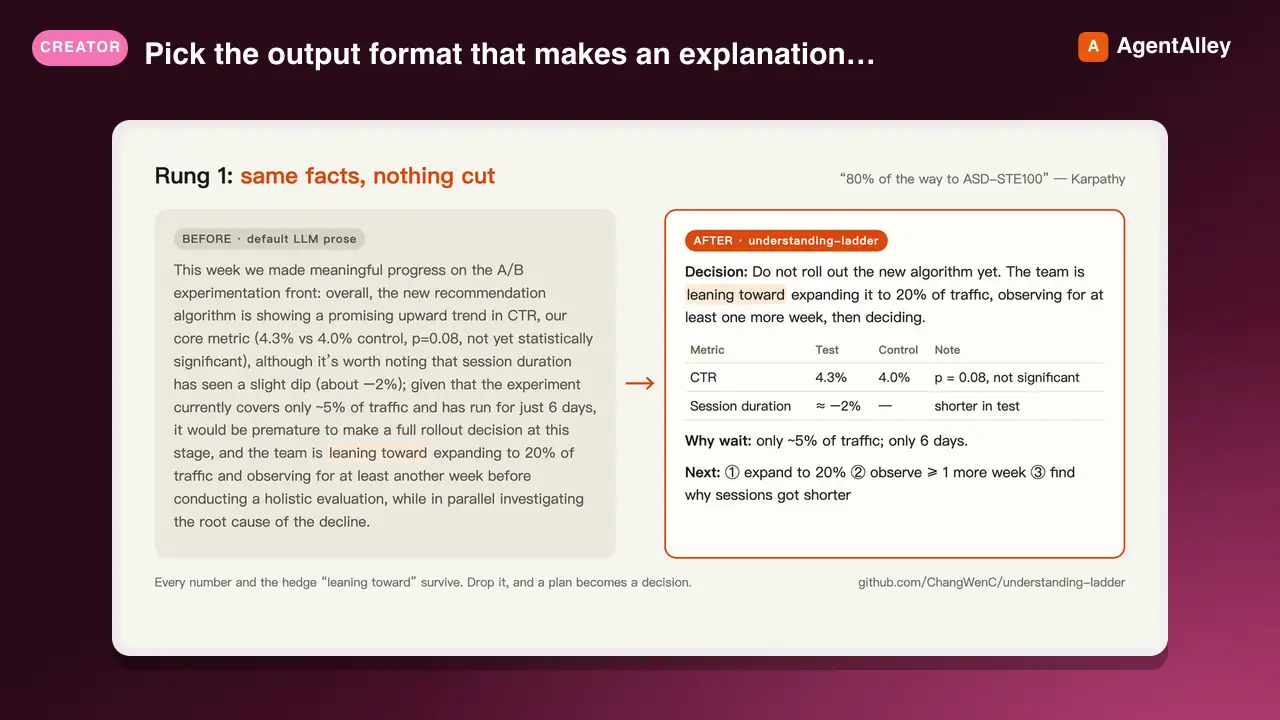
 ChangWenC/understanding-ladder · by ChangWenCPick the output format that makes an explanation easiest to understand, following Karpathy's understanding ladder — (1) plain controlled text, (2) diagram, (3) interactive HTML page, (4) 3Blue1Brown-style explainer video. Classify the content (definition/steps, process/causality, parameter→outcome, unfolding derivation), recommend the lowest rung that fully answers, then produce it. Works in English and Chinese. Use when the user says "explain this clearly", "help me understand", "draw a diagram", "make it interactive", "make an explainer video", "what's the best way to explain X", "understanding ladder", "Karpathy ladder", or 「讲清楚」「帮我理解」「画个图」「做个交互页」「做个讲解视频」「用哪种方式讲最好懂」「理解阶梯」; also when explaining a non-trivial concept, mechanism, algorithm, or an AI agent's output.★ 108 GitHub stars
 SkillA-Roll Animation Generator
 TheMattBerman/scrollclaw · by TheMattBermanAnimate first frames into A-roll talking head clips. Uses Sora 2 via fal.ai (primary) with Kling 3 auto-fallback when Sora is unavailable or sunset.★ 71 GitHub stars
More from davila7
 Skill2D Game Development
 davila7/claude-code-templates · by davila72D game development principles. Sprites, tilemaps, physics, camera.★ 32.3k GitHub stars
 Skill3D Game Development Principlesdavila7/claude-code-templates · by davila73D game development principles. Rendering, shaders, physics, cameras.★ 32.3k GitHub stars
 Skill3D Web Experience Builderdavila7/claude-code-templates · by davila7Expert in building 3D experiences for the web - Three.js, React Three Fiber, Spline, WebGL, and interactive 3D scenes. Covers product configurators, 3D portfolios, immersive websites, and bringing depth to web experiences. Use when: 3D website, three.js, WebGL, react three fiber, 3D experience.★ 32.3k GitHub stars
 SkillSplit Test Setupdavila7/claude-code-templates · by davila7When the user wants to plan, design, or implement an A/B test or experiment. Also use when the user mentions "A/B test," "split test," "experiment," "test this change," "variant copy," "multivariate test," or "hypothesis." For tracking implementation, see analytics-tracking.★ 32.3k GitHub stars
 AgentResearch Literature Synthesizerdavila7/claude-code-templates · by davila7Academic research synthesis specialist. Use PROACTIVELY for comprehensive research on academic topics, literature reviews, technical investigations, and well-cited analysis combining multiple sources. <example>Context: A podcast episode needs a segment grounded in peer-reviewed evidence with formal citations. user: "Research the current state of transformer efficiency techniques for the episode, with proper academic citations." assistant: "I'll use the academic-research-synthesizer agent to search arXiv and Semantic Scholar, extract full-text findings via WebFetch, and produce a cited literature synthesis with confidence levels." <commentary>Use academic-research-synthesizer (not comprehensive-researcher) when the episode segment needs peer-reviewed sourcing, formal citation format, and explicit confidence tagging rather than general-purpose multi-source coverage.</commentary></example> <example>Context: The episode-orchestrator has routed a "literature review" request for a technical deep-dive segment. user: "Summarize the research landscape on federated learning privacy guarantees." assistant: "I'll invoke academic-research-synthesizer to systematically search academic sources, note peer-review status per source, and synthesize consensus vs. open debates."</example>★ 32.3k GitHub stars
 AgentAcademic Research Specialistdavila7/claude-code-templates · by davila7Academic research specialist for scholarly sources, peer-reviewed papers, and academic literature. Use PROACTIVELY for research paper analysis, literature reviews, citation tracking, and academic methodology evaluation. <example>Context: The research-orchestrator has kicked off Phase 4 parallel research on 'efficacy of intermittent fasting' and needs peer-reviewed evidence. user: "Find the academic evidence on intermittent fasting outcomes." assistant: "I'll use the academic-researcher agent to search Semantic Scholar, PubMed, and OpenAlex for peer-reviewed studies and write structured findings to academic-research.md." <commentary>The request is specifically for scholarly/peer-reviewed evidence rather than general web coverage or code, so academic-researcher (not web-researcher or technical-researcher) is the right specialist.</commentary></example> <example>Context: The user wants a literature review comparing methodologies across studies on a topic. user: "Can you review the literature on transformer model interpretability and identify research gaps?" assistant: "Let me invoke the academic-researcher agent to pull foundational and recent papers, extract methodologies, and surface open research gaps." <commentary>Literature review, methodology extraction, and research-gap identification are core academic-researcher capabilities, distinct from technical-researcher's focus on code repositories and implementations.</commentary></example>★ 32.3k GitHub stars