NotebookLM Query Agent
notebooklm
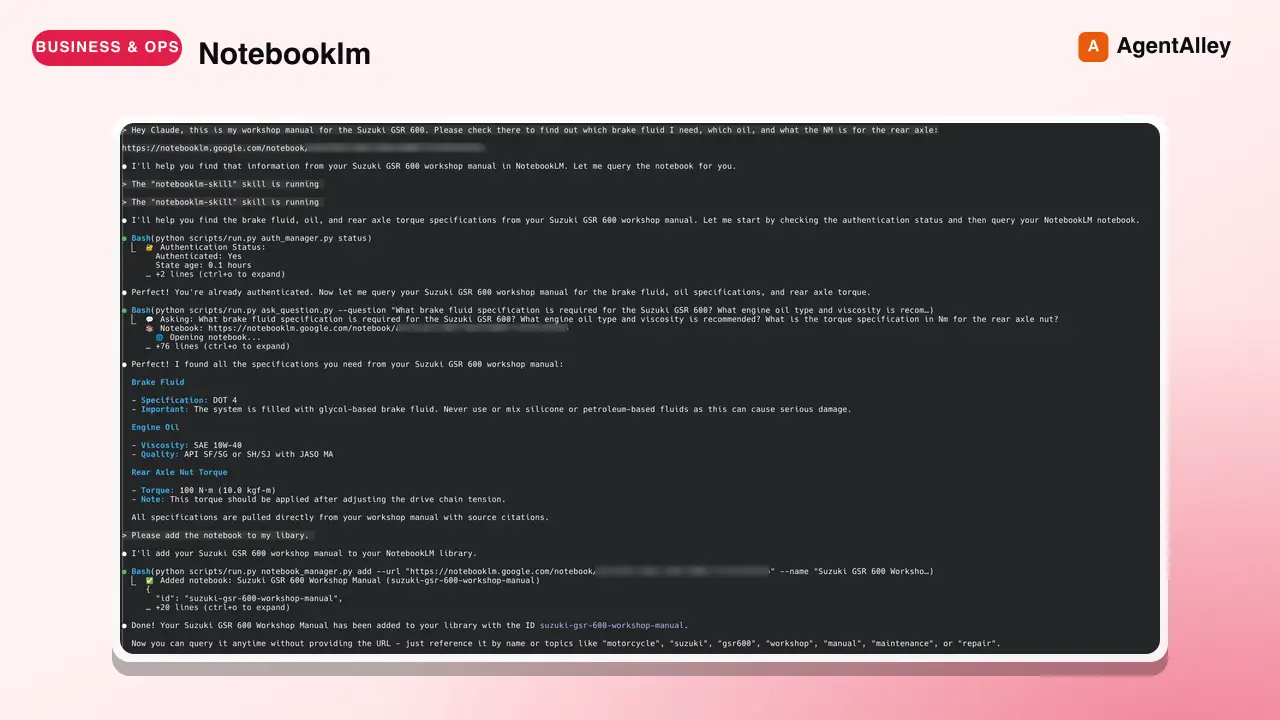
Use this skill to query your Google NotebookLM notebooks directly from Claude Code for source-grounded, citation-backed answers from Gemini. Browser automation, library management, persistent auth.
---
name: notebooklm
description: Use this skill to query your Google NotebookLM notebooks directly from Claude Code for source-grounded, citation-backed answers from Gemini. Browser automation, library management, persistent auth. Drastically reduced hallucinations through document-only responses.
---

# NotebookLM Research Assistant Skill

Interact with Google NotebookLM to query documentation with Gemini's source-grounded answers. Each question opens a fresh browser session, retrieves the answer exclusively from your uploaded documents, and closes.

## When to Use This Skill

Trigger when user:
- Mentions NotebookLM explicitly
- Shares NotebookLM URL (`https://notebooklm.google.com/notebook/...`)
- Asks to query their notebooks/documentation
- Wants to add documentation to NotebookLM library
- Uses phrases like "ask my NotebookLM", "check my docs", "query my notebook"
Overview
Interact with Google NotebookLM to query documentation with Gemini's source-grounded answers. Each question opens a fresh browser session, retrieves the answer exclusively from your uploaded documents, and closes.
Manual install (npx, ZIP)
npx skills add davila7/claude-code-templates --skill notebooklm -g -a claude-codenpx degit davila7/claude-code-templates/cli-tool/components/skills/productivity/notebooklm#main ~/.claude/skills/notebooklm-davila7Connects with Agent Alley MCP · agentalley.io/mcp
Files included
SKILL.md9.2 KB
Read SKILL.md here
Show the full text270 lines
NotebookLM Research Assistant Skill
Interact with Google NotebookLM to query documentation with Gemini's source-grounded answers. Each question opens a fresh browser session, retrieves the answer exclusively from your uploaded documents, and closes.
When to Use This Skill
Trigger when user:
- Mentions NotebookLM explicitly
- Shares NotebookLM URL (
https://notebooklm.google.com/notebook/...) - Asks to query their notebooks/documentation
- Wants to add documentation to NotebookLM library
- Uses phrases like "ask my NotebookLM", "check my docs", "query my notebook"
⚠️ CRITICAL: Add Command - Smart Discovery
When user wants to add a notebook without providing details:
SMART ADD (Recommended): Query the notebook first to discover its content:
# Step 1: Query the notebook about its content
python scripts/run.py ask_question.py --question "What is the content of this notebook? What topics are covered? Provide a complete overview briefly and concisely" --notebook-url "[URL]"

# Step 2: Use the discovered information to add it
python scripts/run.py notebook_manager.py add --url "[URL]" --name "[Based on content]" --description "[Based on content]" --topics "[Based on content]"
MANUAL ADD: If user provides all details:
--url- The NotebookLM URL--name- A descriptive name--description- What the notebook contains (REQUIRED!)--topics- Comma-separated topics (REQUIRED!)
NEVER guess or use generic descriptions! If details missing, use Smart Add to discover them.
Critical: Always Use run.py Wrapper
NEVER call scripts directly. ALWAYS use python scripts/run.py [script]:
# ✅ CORRECT - Always use run.py:
python scripts/run.py auth_manager.py status
python scripts/run.py notebook_manager.py list
python scripts/run.py ask_question.py --question "..."

# ❌ WRONG - Never call directly:
python scripts/auth_manager.py status  # Fails without venv!
The run.py wrapper automatically:
- Creates
.venvif needed - Installs all dependencies
- Activates environment
- Executes script properly
Core Workflow
Step 1: Check Authentication Status
python scripts/run.py auth_manager.py status
If not authenticated, proceed to setup.
Step 2: Authenticate (One-Time Setup)
# Browser MUST be visible for manual Google login
python scripts/run.py auth_manager.py setup
Important:
- Browser is VISIBLE for authentication
- Browser window opens automatically
- User must manually log in to Google
- Tell user: "A browser window will open for Google login"
Step 3: Manage Notebook Library
# List all notebooks
python scripts/run.py notebook_manager.py list

# BEFORE ADDING: Ask user for metadata if unknown!
# "What does this notebook contain?"
# "What topics should I tag it with?"

# Add notebook to library (ALL parameters are REQUIRED!)
python scripts/run.py notebook_manager.py add \
  --url "https://notebooklm.google.com/notebook/..." \
  --name "Descriptive Name" \
  --description "What this notebook contains" \  # REQUIRED - ASK USER IF UNKNOWN!
  --topics "topic1,topic2,topic3"  # REQUIRED - ASK USER IF UNKNOWN!

# Search notebooks by topic
python scripts/run.py notebook_manager.py search --query "keyword"

# Set active notebook
python scripts/run.py notebook_manager.py activate --id notebook-id

# Remove notebook
python scripts/run.py notebook_manager.py remove --id notebook-id
Quick Workflow
- Check library:
python scripts/run.py notebook_manager.py list - Ask question:
python scripts/run.py ask_question.py --question "..." --notebook-id ID
Step 4: Ask Questions
# Basic query (uses active notebook if set)
python scripts/run.py ask_question.py --question "Your question here"

# Query specific notebook
python scripts/run.py ask_question.py --question "..." --notebook-id notebook-id

# Query with notebook URL directly
python scripts/run.py ask_question.py --question "..." --notebook-url "https://..."

# Show browser for debugging
python scripts/run.py ask_question.py --question "..." --show-browser
Follow-Up Mechanism (CRITICAL)
Every NotebookLM answer ends with: "EXTREMELY IMPORTANT: Is that ALL you need to know?"
Required Claude Behavior:
- STOP - Do not immediately respond to user
- ANALYZE - Compare answer to user's original request
- IDENTIFY GAPS - Determine if more information needed
- ASK FOLLOW-UP - If gaps exist, immediately ask:
python scripts/run.py ask_question.py --question "Follow-up with context..." - REPEAT - Continue until information is complete
- SYNTHESIZE - Combine all answers before responding to user
Script Reference
Authentication Management (auth_manager.py)
python scripts/run.py auth_manager.py setup    # Initial setup (browser visible)
python scripts/run.py auth_manager.py status   # Check authentication
python scripts/run.py auth_manager.py reauth   # Re-authenticate (browser visible)
python scripts/run.py auth_manager.py clear    # Clear authentication
Notebook Management (notebook_manager.py)
python scripts/run.py notebook_manager.py add --url URL --name NAME --description DESC --topics TOPICS
python scripts/run.py notebook_manager.py list
python scripts/run.py notebook_manager.py search --query QUERY
python scripts/run.py notebook_manager.py activate --id ID
python scripts/run.py notebook_manager.py remove --id ID
python scripts/run.py notebook_manager.py stats
Question Interface (ask_question.py)
python scripts/run.py ask_question.py --question "..." [--notebook-id ID] [--notebook-url URL] [--show-browser]
Data Cleanup (cleanup_manager.py)
python scripts/run.py cleanup_manager.py                    # Preview cleanup
python scripts/run.py cleanup_manager.py --confirm          # Execute cleanup
python scripts/run.py cleanup_manager.py --preserve-library # Keep notebooks
Environment Management
The virtual environment is automatically managed:
- First run creates
.venvautomatically - Dependencies install automatically
- Chromium browser installs automatically
- Everything isolated in skill directory
Manual setup (only if automatic fails):
python -m venv .venv
source .venv/bin/activate  # Linux/Mac
pip install -r requirements.txt
python -m patchright install chromium
Data Storage
All data stored in ~/.claude/skills/notebooklm/data/:
library.json- Notebook metadataauth_info.json- Authentication statusbrowser_state/- Browser cookies and session
Security: Protected by .gitignore, never commit to git.
Configuration
Optional .env file in skill directory:
HEADLESS=false           # Browser visibility
SHOW_BROWSER=false       # Default browser display
STEALTH_ENABLED=true     # Human-like behavior
TYPING_WPM_MIN=160       # Typing speed
TYPING_WPM_MAX=240
DEFAULT_NOTEBOOK_ID=     # Default notebook
Decision Flow
User mentions NotebookLM
    ↓
Check auth → python scripts/run.py auth_manager.py status
    ↓
If not authenticated → python scripts/run.py auth_manager.py setup
    ↓
Check/Add notebook → python scripts/run.py notebook_manager.py list/add (with --description)
    ↓
Activate notebook → python scripts/run.py notebook_manager.py activate --id ID
    ↓
Ask question → python scripts/run.py ask_question.py --question "..."
    ↓
See "Is that ALL you need?" → Ask follow-ups until complete
    ↓
Synthesize and respond to user
Troubleshooting
| Problem | Solution |
|---|---|
| ModuleNotFoundError | Use run.py wrapper |
| Authentication fails | Browser must be visible for setup! --show-browser |
| Rate limit (50/day) | Wait or switch Google account |
| Browser crashes | python scripts/run.py cleanup_manager.py --preserve-library |
| Notebook not found | Check with notebook_manager.py list |
Best Practices
- Always use run.py - Handles environment automatically
- Check auth first - Before any operations
- Follow-up questions - Don't stop at first answer
- Browser visible for auth - Required for manual login
- Include context - Each question is independent
- Synthesize answers - Combine multiple responses
Limitations
- No session persistence (each question = new browser)
- Rate limits on free Google accounts (50 queries/day)
- Manual upload required (user must add docs to NotebookLM)
- Browser overhead (few seconds per question)
Resources (Skill Structure)
Important directories and files:
scripts/- All automation scripts (ask_question.py, notebook_manager.py, etc.)data/- Local storage for authentication and notebook libraryreferences/- Extended documentation:api_reference.md- Detailed API documentation for all scriptstroubleshooting.md- Common issues and solutionsusage_patterns.md- Best practices and workflow examples
.venv/- Isolated Python environment (auto-created on first run).gitignore- Protects sensitive data from being committed
| 1 | |
| 2 | name notebooklm |
| 3 | description Use this skill to query your Google NotebookLM notebooks directly from Claude Code for source-grounded, citation-backed answers from Gemini. Browser automation, library management, persistent auth. Drastically reduced hallucinations through document-only responses. |
| 4 | |
| 5 | |
| 6 | # NotebookLM Research Assistant Skill |
| 7 | |
| 8 | Interact with Google NotebookLM to query documentation with Gemini's source-grounded answers. Each question opens a fresh browser session, retrieves the answer exclusively from your uploaded documents, and closes. |
| 9 | |
| 10 | ## When to Use This Skill |
| 11 | |
| 12 | Trigger when user: |
| 13 | Mentions NotebookLM explicitly |
| 14 | Shares NotebookLM URL (`https://notebooklm.google.com/notebook/...`) |
| 15 | Asks to query their notebooks/documentation |
| 16 | Wants to add documentation to NotebookLM library |
| 17 | Uses phrases like "ask my NotebookLM", "check my docs", "query my notebook" |
| 18 | |
| 19 | ## ⚠️ CRITICAL: Add Command - Smart Discovery |
| 20 | |
| 21 | When user wants to add a notebook without providing details: |
| 22 | |
| 23 | **SMART ADD (Recommended)**: Query the notebook first to discover its content: |
| 24 | |
| 25 | # Step 1: Query the notebook about its content |
| 26 | python scripts/run.py ask_question.py --question "What is the content of this notebook? What topics are covered? Provide a complete overview briefly and concisely" --notebook-url "[URL]" |
| 27 | |
| 28 | # Step 2: Use the discovered information to add it |
| 29 | python scripts/run.py notebook_manager.py add --url "[URL]" --name "[Based on content]" --description "[Based on content]" --topics "[Based on content]" |
| 30 | |
| 31 | |
| 32 | **MANUAL ADD**: If user provides all details: |
| 33 | `--url` - The NotebookLM URL |
| 34 | `--name` - A descriptive name |
| 35 | `--description` - What the notebook contains (REQUIRED!) |
| 36 | `--topics` - Comma-separated topics (REQUIRED!) |
| 37 | |
| 38 | NEVER guess or use generic descriptions! If details missing, use Smart Add to discover them. |
| 39 | |
| 40 | ## Critical: Always Use run.py Wrapper |
| 41 | |
| 42 | **NEVER call scripts directly. ALWAYS use `python scripts/run.py [script]`:** |
| 43 | |
| 44 | |
| 45 | # ✅ CORRECT - Always use run.py: |
| 46 | python scripts/run.py auth_manager.py status |
| 47 | python scripts/run.py notebook_manager.py list |
| 48 | python scripts/run.py ask_question.py --question "..." |
| 49 | |
| 50 | # ❌ WRONG - Never call directly: |
| 51 | python scripts/auth_manager.py status # Fails without venv! |
| 52 | |
| 53 | |
| 54 | The `run.py` wrapper automatically: |
| 55 | Creates `.venv` if needed |
| 56 | Installs all dependencies |
| 57 | Activates environment |
| 58 | Executes script properly |
| 59 | |
| 60 | ## Core Workflow |
| 61 | |
| 62 | ### Step 1: Check Authentication Status |
| 63 | |
| 64 | python scripts/run.py auth_manager.py status |
| 65 | |
| 66 | |
| 67 | If not authenticated, proceed to setup. |
| 68 | |
| 69 | ### Step 2: Authenticate (One-Time Setup) |
| 70 | |
| 71 | # Browser MUST be visible for manual Google login |
| 72 | python scripts/run.py auth_manager.py setup |
| 73 | |
| 74 | |
| 75 | **Important:** |
| 76 | Browser is VISIBLE for authentication |
| 77 | Browser window opens automatically |
| 78 | User must manually log in to Google |
| 79 | Tell user: "A browser window will open for Google login" |
| 80 | |
| 81 | ### Step 3: Manage Notebook Library |
| 82 | |
| 83 | |
| 84 | # List all notebooks |
| 85 | python scripts/run.py notebook_manager.py list |
| 86 | |
| 87 | # BEFORE ADDING: Ask user for metadata if unknown! |
| 88 | # "What does this notebook contain?" |
| 89 | # "What topics should I tag it with?" |
| 90 | |
| 91 | # Add notebook to library (ALL parameters are REQUIRED!) |
| 92 | python scripts/run.py notebook_manager.py add \ |
| 93 | --url "https://notebooklm.google.com/notebook/..." \ |
| 94 | --name "Descriptive Name" \ |
| 95 | --description "What this notebook contains" \ # REQUIRED - ASK USER IF UNKNOWN! |
| 96 | --topics "topic1,topic2,topic3" # REQUIRED - ASK USER IF UNKNOWN! |
| 97 | |
| 98 | # Search notebooks by topic |
| 99 | python scripts/run.py notebook_manager.py search --query "keyword" |
| 100 | |
| 101 | # Set active notebook |
| 102 | python scripts/run.py notebook_manager.py activate --id notebook-id |
| 103 | |
| 104 | # Remove notebook |
| 105 | python scripts/run.py notebook_manager.py remove --id notebook-id |
| 106 | |
| 107 | |
| 108 | ### Quick Workflow |
| 109 | Check library: `python scripts/run.py notebook_manager.py list` |
| 110 | Ask question: `python scripts/run.py ask_question.py --question "..." --notebook-id ID` |
| 111 | |
| 112 | ### Step 4: Ask Questions |
| 113 | |
| 114 | |
| 115 | # Basic query (uses active notebook if set) |
| 116 | python scripts/run.py ask_question.py --question "Your question here" |
| 117 | |
| 118 | # Query specific notebook |
| 119 | python scripts/run.py ask_question.py --question "..." --notebook-id notebook-id |
| 120 | |
| 121 | # Query with notebook URL directly |
| 122 | python scripts/run.py ask_question.py --question "..." --notebook-url "https://..." |
| 123 | |
| 124 | # Show browser for debugging |
| 125 | python scripts/run.py ask_question.py --question "..." --show-browser |
| 126 | |
| 127 | |
| 128 | ## Follow-Up Mechanism (CRITICAL) |
| 129 | |
| 130 | Every NotebookLM answer ends with: **"EXTREMELY IMPORTANT: Is that ALL you need to know?"** |
| 131 | |
| 132 | **Required Claude Behavior:** |
| 133 | **STOP** - Do not immediately respond to user |
| 134 | **ANALYZE** - Compare answer to user's original request |
| 135 | **IDENTIFY GAPS** - Determine if more information needed |
| 136 | **ASK FOLLOW-UP** - If gaps exist, immediately ask: |
| 137 | |
| 138 | python scripts/run.py ask_question.py --question "Follow-up with context..." |
| 139 | |
| 140 | **REPEAT** - Continue until information is complete |
| 141 | **SYNTHESIZE** - Combine all answers before responding to user |
| 142 | |
| 143 | ## Script Reference |
| 144 | |
| 145 | ### Authentication Management (`auth_manager.py`) |
| 146 | |
| 147 | python scripts/run.py auth_manager.py setup # Initial setup (browser visible) |
| 148 | python scripts/run.py auth_manager.py status # Check authentication |
| 149 | python scripts/run.py auth_manager.py reauth # Re-authenticate (browser visible) |
| 150 | python scripts/run.py auth_manager.py clear # Clear authentication |
| 151 | |
| 152 | |
| 153 | ### Notebook Management (`notebook_manager.py`) |
| 154 | |
| 155 | python scripts/run.py notebook_manager.py add --url URL --name NAME --description DESC --topics TOPICS |
| 156 | python scripts/run.py notebook_manager.py list |
| 157 | python scripts/run.py notebook_manager.py search --query QUERY |
| 158 | python scripts/run.py notebook_manager.py activate --id ID |
| 159 | python scripts/run.py notebook_manager.py remove --id ID |
| 160 | python scripts/run.py notebook_manager.py stats |
| 161 | |
| 162 | |
| 163 | ### Question Interface (`ask_question.py`) |
| 164 | |
| 165 | python scripts/run.py ask_question.py --question "..." [--notebook-id ID] [--notebook-url URL] [--show-browser] |
| 166 | |
| 167 | |
| 168 | ### Data Cleanup (`cleanup_manager.py`) |
| 169 | |
| 170 | python scripts/run.py cleanup_manager.py # Preview cleanup |
| 171 | python scripts/run.py cleanup_manager.py --confirm # Execute cleanup |
| 172 | python scripts/run.py cleanup_manager.py --preserve-library # Keep notebooks |
| 173 | |
| 174 | |
| 175 | ## Environment Management |
| 176 | |
| 177 | The virtual environment is automatically managed: |
| 178 | First run creates `.venv` automatically |
| 179 | Dependencies install automatically |
| 180 | Chromium browser installs automatically |
| 181 | Everything isolated in skill directory |
| 182 | |
| 183 | Manual setup (only if automatic fails): |
| 184 | |
| 185 | python -m venv .venv |
| 186 | source .venv/bin/activate # Linux/Mac |
| 187 | pip install -r requirements.txt |
| 188 | python -m patchright install chromium |
| 189 | |
| 190 | |
| 191 | ## Data Storage |
| 192 | |
| 193 | All data stored in `~/.claude/skills/notebooklm/data/`: |
| 194 | `library.json` - Notebook metadata |
| 195 | `auth_info.json` - Authentication status |
| 196 | `browser_state/` - Browser cookies and session |
| 197 | |
| 198 | **Security:** Protected by `.gitignore`, never commit to git. |
| 199 | |
| 200 | ## Configuration |
| 201 | |
| 202 | Optional `.env` file in skill directory: |
| 203 | |
| 204 | HEADLESS=false # Browser visibility |
| 205 | SHOW_BROWSER=false # Default browser display |
| 206 | STEALTH_ENABLED=true # Human-like behavior |
| 207 | TYPING_WPM_MIN=160 # Typing speed |
| 208 | TYPING_WPM_MAX=240 |
| 209 | DEFAULT_NOTEBOOK_ID= # Default notebook |
| 210 | |
| 211 | |
| 212 | ## Decision Flow |
| 213 | |
| 214 | |
| 215 | User mentions NotebookLM |
| 216 | ↓ |
| 217 | Check auth → python scripts/run.py auth_manager.py status |
| 218 | ↓ |
| 219 | If not authenticated → python scripts/run.py auth_manager.py setup |
| 220 | ↓ |
| 221 | Check/Add notebook → python scripts/run.py notebook_manager.py list/add (with --description) |
| 222 | ↓ |
| 223 | Activate notebook → python scripts/run.py notebook_manager.py activate --id ID |
| 224 | ↓ |
| 225 | Ask question → python scripts/run.py ask_question.py --question "..." |
| 226 | ↓ |
| 227 | See "Is that ALL you need?" → Ask follow-ups until complete |
| 228 | ↓ |
| 229 | Synthesize and respond to user |
| 230 | |
| 231 | |
| 232 | ## Troubleshooting |
| 233 | |
| 234 | | Problem | Solution | |
| 235 | |---------|----------| |
| 236 | | ModuleNotFoundError | Use `run.py` wrapper | |
| 237 | | Authentication fails | Browser must be visible for setup! --show-browser | |
| 238 | | Rate limit (50/day) | Wait or switch Google account | |
| 239 | | Browser crashes | `python scripts/run.py cleanup_manager.py --preserve-library` | |
| 240 | | Notebook not found | Check with `notebook_manager.py list` | |
| 241 | |
| 242 | ## Best Practices |
| 243 | |
| 244 | **Always use run.py** - Handles environment automatically |
| 245 | **Check auth first** - Before any operations |
| 246 | **Follow-up questions** - Don't stop at first answer |
| 247 | **Browser visible for auth** - Required for manual login |
| 248 | **Include context** - Each question is independent |
| 249 | **Synthesize answers** - Combine multiple responses |
| 250 | |
| 251 | ## Limitations |
| 252 | |
| 253 | No session persistence (each question = new browser) |
| 254 | Rate limits on free Google accounts (50 queries/day) |
| 255 | Manual upload required (user must add docs to NotebookLM) |
| 256 | Browser overhead (few seconds per question) |
| 257 | |
| 258 | ## Resources (Skill Structure) |
| 259 | |
| 260 | **Important directories and files:** |
| 261 | |
| 262 | `scripts/` - All automation scripts (ask_question.py, notebook_manager.py, etc.) |
| 263 | `data/` - Local storage for authentication and notebook library |
| 264 | `references/` - Extended documentation: |
| 265 | `api_reference.md` - Detailed API documentation for all scripts |
| 266 | `troubleshooting.md` - Common issues and solutions |
| 267 | `usage_patterns.md` - Best practices and workflow examples |
| 268 | `.venv/` - Isolated Python environment (auto-created on first run) |
| 269 | `.gitignore` - Protects sensitive data from being committed |
| 270 |
Details
- License
- MIT
- Stars on the repo
- ★ 32,299
- Checked
- Source
- davila7/claude-code-templates ↗
- Creator
- davila7 · 212 listings
Similar skills
See all → SkillBrowser Automation
 ruvnet/RuView · by ruvnetWeb browser automation with AI-optimized snapshots for claude-flow agents★ 94.7k GitHub stars
 SkillDeepeval LLM Assessment
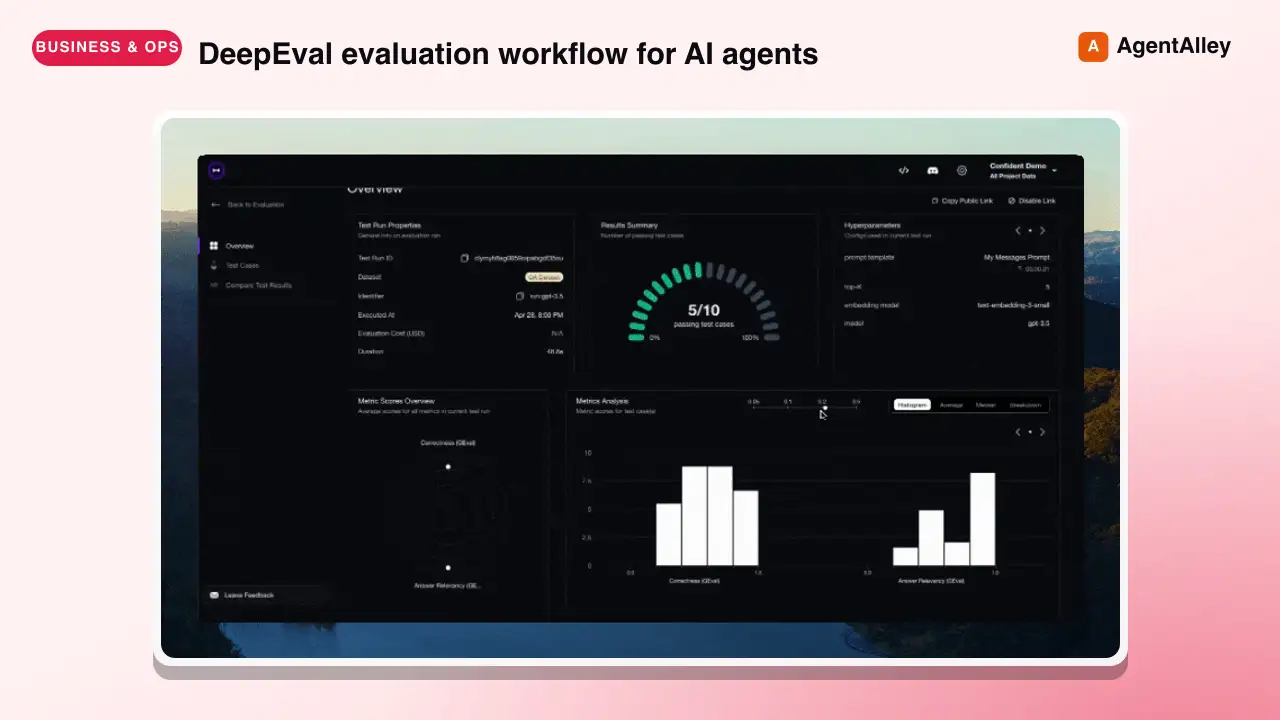
 confident-ai/deepeval · by confident-aiDeepEval evaluation workflow for AI agents and LLM applications. TRIGGER when the user wants to evaluate or improve an AI agent, tool-using workflow, multi-turn chatbot, RAG pipeline, or LLM app; add evals; generate datasets or goldens; use deepeval generate; use deepeval test run; send results to Confident AI; monitor production; run online evals; inspect traces; or iterate on prompts, tools, retrieval, or agent behavior from eval failures. AI agents are the primary use case. Covers Python SDK, pytest eval suites, CLI generation, traced evals, Confident AI reporting, and agent-driven improvement loops. DO NOT TRIGGER for unrelated generic pytest, non-AI test setup, or non-DeepEval observability work unless the user asks to compare or migrate to DeepEval; for instrumenting an app with DeepEval tracing, @observe, or framework integrations (use the `deepeval-tracing` skill); or for raw OpenTelemetry / OTLP export without the deepeval package (use the `deepeval-otel` skill).★ 18.7k GitHub stars
 SkillBrowser Automation Tool
 SawyerHood/dev-browser · by SawyerHoodBrowser automation with persistent named pages via the dev-browser CLI. Use when users ask to navigate websites, fill forms, take screenshots, extract web data, test web apps, log into sites, or automate browser workflows. Trigger phrases include "go to [url]", "click on", "fill out the form", "take a screenshot", "scrape", "automate", "test the website", "log into", "open the browser", or any browser interaction request.★ 6.7k GitHub stars
 SkillSkill to App Converter
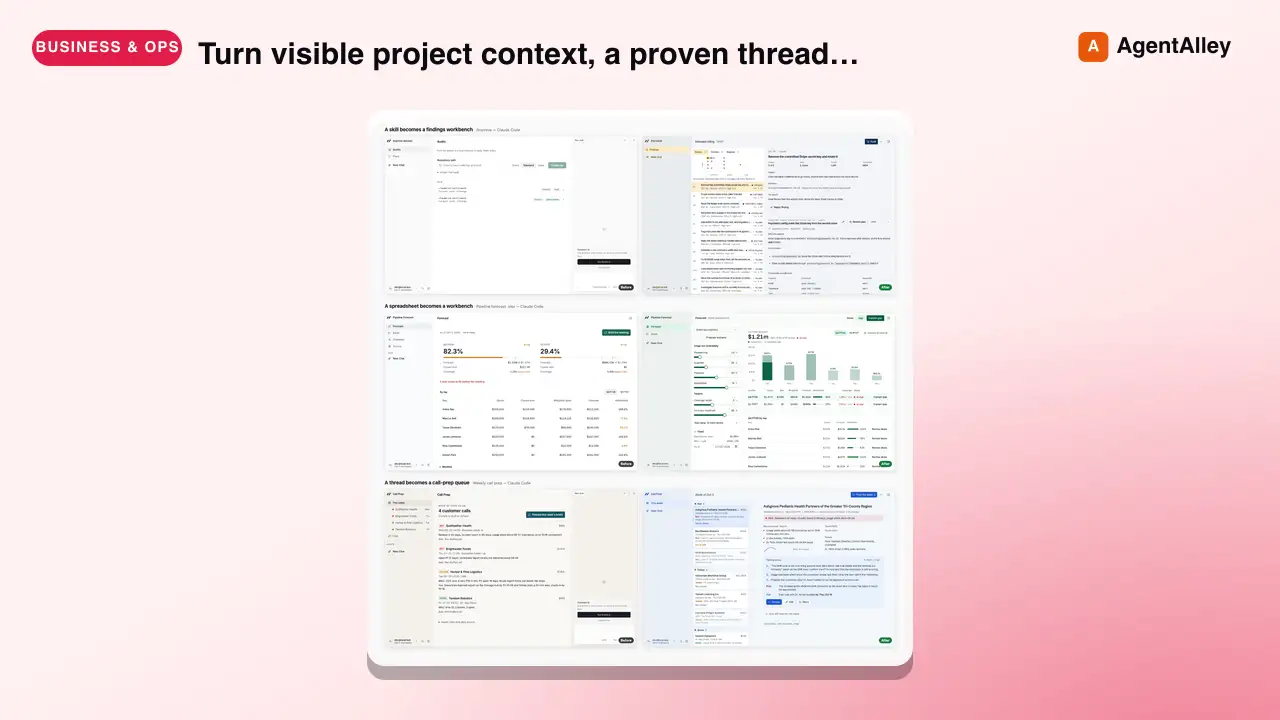
 BuilderIO/skills · by BuilderIOTurn visible project context, a proven thread, skill, or workflow into a runnable Agent-Native app with simple buttons, visible agent steps, preview, and deployment handoff. Use when a user invokes `/turn-into-app` or asks to make a workflow into an app, including from Claude or ChatGPT on the web, including when the source is a spreadsheet link or upload.★ 4.5k GitHub stars
 SkillBrowser Test Automation
 lackeyjb/playwright-skill · by lackeyjbComplete browser automation with Playwright. Auto-detects dev servers, writes reusable test scripts, and supports screenshots, responsive checks, UX validation, login flows, link checks, and arbitrary browser automation. Use when the user wants to test a website, automate browser interactions, validate web functionality, or perform browser-based testing.★ 3.2k GitHub stars
 SkillTinyFish CLI
 tinyfish-io/tinyfish-cookbook · by tinyfish-ioUse TinyFish for web search, fetching URLs, reading pages, current information, source-backed answers, research, docs, pricing/product pages, extraction, scraping, and browser automation. Use whenever the user asks to search, find, look up, research, compare, get information from the web, summarize a URL, fetch page content, or automate a website.★ 2.2k GitHub stars
More from davila7
 Skill2D Game Development
 davila7/claude-code-templates · by davila72D game development principles. Sprites, tilemaps, physics, camera.★ 32.3k GitHub stars
 Skill3D Game Development Principlesdavila7/claude-code-templates · by davila73D game development principles. Rendering, shaders, physics, cameras.★ 32.3k GitHub stars
 Skill3D Web Experience Builderdavila7/claude-code-templates · by davila7Expert in building 3D experiences for the web - Three.js, React Three Fiber, Spline, WebGL, and interactive 3D scenes. Covers product configurators, 3D portfolios, immersive websites, and bringing depth to web experiences. Use when: 3D website, three.js, WebGL, react three fiber, 3D experience.★ 32.3k GitHub stars
 SkillSplit Test Setupdavila7/claude-code-templates · by davila7When the user wants to plan, design, or implement an A/B test or experiment. Also use when the user mentions "A/B test," "split test," "experiment," "test this change," "variant copy," "multivariate test," or "hypothesis." For tracking implementation, see analytics-tracking.★ 32.3k GitHub stars
 AgentResearch Literature Synthesizerdavila7/claude-code-templates · by davila7Academic research synthesis specialist. Use PROACTIVELY for comprehensive research on academic topics, literature reviews, technical investigations, and well-cited analysis combining multiple sources. <example>Context: A podcast episode needs a segment grounded in peer-reviewed evidence with formal citations. user: "Research the current state of transformer efficiency techniques for the episode, with proper academic citations." assistant: "I'll use the academic-research-synthesizer agent to search arXiv and Semantic Scholar, extract full-text findings via WebFetch, and produce a cited literature synthesis with confidence levels." <commentary>Use academic-research-synthesizer (not comprehensive-researcher) when the episode segment needs peer-reviewed sourcing, formal citation format, and explicit confidence tagging rather than general-purpose multi-source coverage.</commentary></example> <example>Context: The episode-orchestrator has routed a "literature review" request for a technical deep-dive segment. user: "Summarize the research landscape on federated learning privacy guarantees." assistant: "I'll invoke academic-research-synthesizer to systematically search academic sources, note peer-review status per source, and synthesize consensus vs. open debates."</example>★ 32.3k GitHub stars
 AgentAcademic Research Specialistdavila7/claude-code-templates · by davila7Academic research specialist for scholarly sources, peer-reviewed papers, and academic literature. Use PROACTIVELY for research paper analysis, literature reviews, citation tracking, and academic methodology evaluation. <example>Context: The research-orchestrator has kicked off Phase 4 parallel research on 'efficacy of intermittent fasting' and needs peer-reviewed evidence. user: "Find the academic evidence on intermittent fasting outcomes." assistant: "I'll use the academic-researcher agent to search Semantic Scholar, PubMed, and OpenAlex for peer-reviewed studies and write structured findings to academic-research.md." <commentary>The request is specifically for scholarly/peer-reviewed evidence rather than general web coverage or code, so academic-researcher (not web-researcher or technical-researcher) is the right specialist.</commentary></example> <example>Context: The user wants a literature review comparing methodologies across studies on a topic. user: "Can you review the literature on transformer model interpretability and identify research gaps?" assistant: "Let me invoke the academic-researcher agent to pull foundational and recent papers, extract methodologies, and surface open research gaps." <commentary>Literature review, methodology extraction, and research-gap identification are core academic-researcher capabilities, distinct from technical-researcher's focus on code repositories and implementations.</commentary></example>★ 32.3k GitHub stars